Data Sources
Flexible GraphRAG supports 14 data sources for ingesting documents into your knowledge base.
Per-user permissions: documents from Alfresco, Nuxeo, CMIS, SharePoint, OneDrive, Box, Google Drive, Cloud Storage, Azure Blob and Amazon S3 can be limited to what the person asking may read, checked at query time. See the Sign-In and Permission-Aware Search guide and the per-source pages: Microsoft 365, Box, Google, Azure Storage, Amazon S3, CMIS vendors, Nuxeo.
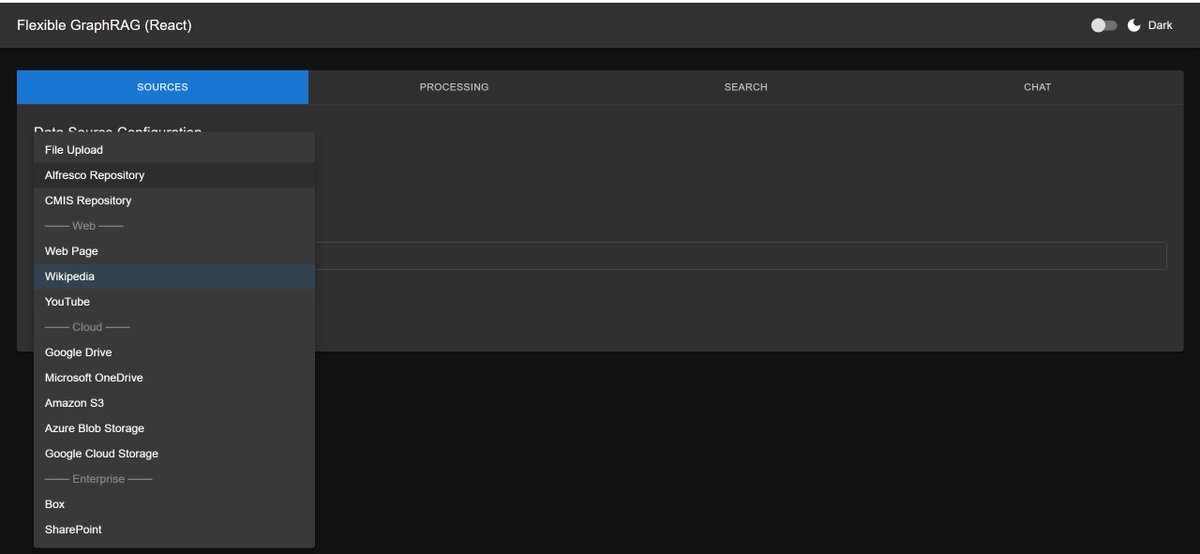
Overview
| Category | Sources |
|---|---|
| File & Upload | File Upload |
| Cloud Storage | Amazon S3, Google Cloud Storage, Azure Blob Storage, Google Drive, Microsoft OneDrive |
| Enterprise Repositories | Alfresco, Nuxeo, Microsoft SharePoint, Box, CMIS |
| Web Sources | Web Pages, Wikipedia, YouTube |
All data sources support:
- Docling (default), LlamaParse or LiteParse document parser
- Skip Graph — ingest to vector + search only, skip KG extraction (with the incremental registry on, the Processing tab's per-row Search+Vector / Graphs / Auto Sync columns do this for every data source; see Tab 2 — Processing)
- Incremental Auto-Sync — keep databases synchronized when files change (most sources)
Each data source includes:
- Configuration Forms: Easy-to-use interfaces for credentials and settings
- Progress Tracking: Real-time per-file progress indicators
- Flexible Authentication: Support for various auth methods (API keys, OAuth, service accounts)
File Upload
No credentials required. Supports drag & drop or file dialog.
- UI: Sources tab → "File Upload" → drag files or click to select
- API:
POST /api/uploadwith multipart form data - MCP:
ingest_documents()withsource_type: "filesystem"andpaths
Cloud Storage Sources
Amazon S3
# .env configuration
AWS_ACCESS_KEY_ID=your_access_key
AWS_SECRET_ACCESS_KEY=your_secret_key
AWS_DEFAULT_REGION=us-east-1
S3_BUCKET_NAME=your-bucket-name
S3_PREFIX=optional/prefix/      # optional
Incremental updates supported via SQS event notifications. See S3 Setup Guide for full setup.
Google Cloud Storage
GOOGLE_APPLICATION_CREDENTIALS=/path/to/service-account.json
GCS_BUCKET_NAME=your-bucket-name
GCS_PREFIX=optional/prefix/     # optional
Incremental updates supported via Pub/Sub notifications. See GCS Setup Guide for full setup.
Azure Blob Storage
AZURE_STORAGE_CONNECTION_STRING=DefaultEndpointsProtocol=https;...
AZURE_CONTAINER_NAME=your-container-name
Incremental updates supported via Change Feed. See Azure Blob Setup Guide for full setup.
Google Drive
Requires OAuth credentials or service account. See Data Source Configuration for setup.
Incremental updates supported via Changes API (polling).
Microsoft OneDrive
Requires Microsoft Entra app registration (OneDrive for Business only).
Note
Personal OneDrive is not supported. OneDrive for Business can be accessed with a M365 Developer Program sandbox.
Incremental updates supported via polling.
Enterprise Repository Sources
Alfresco
Two integration modes:
- KG Spaces ACA Extension — multi-select documents/folders directly from the Alfresco Content Application using nodeIds. Its title bar has a sign-in pill for the other sources and servers (ACA's own Alfresco uses ACA's ticket); see Sign-In guide — Alfresco
- Direct Integration — use Alfresco paths (e.g.,
/Shared/GraphRAG/cmispress.txt)
Alfresco also supports ticket and OAuth2 (Bearer via the identity-service subsystem, e.g. Keycloak) auth, selectable in the UI. For OAuth2, prefer a user token for content operations: client_credentials runs as the client's service account — a just-in-time user with no display name and only default permissions (not admin, not guest) — whereas a user token gives a real display name and that user's ACLs.
See Alfresco Integration Guide for the full setup (Keycloak / identity-service, client-credentials vs. user token, token minting, incremental sync).
Incremental updates supported via ActiveMQ events (real-time).
Nuxeo
Ingest documents from a Nuxeo repository (File and Note documents). Three authentication methods: basic, token (X-Authentication-Token), and OAuth2 (Bearer / PKCE).
NUXEO_URL=http://localhost:8081/nuxeo
NUXEO_AUTH_METHOD=basic
NUXEO_USERNAME=Administrator
NUXEO_PASSWORD=Administrator
NUXEO_PATH=/default-domain/workspaces
Incremental updates supported via the Kafka audit stream (real-time).
KG Spaces for Nuxeo (v0.9.0+) adds a KG Spaces menu to Nuxeo Web UI to add documents and folders, or ask about one, as KG Spaces does in ACA; see Nuxeo Setup Guide — KG Spaces for Nuxeo.
See Nuxeo Setup Guide.
Microsoft SharePoint
Requires Microsoft Entra app registration. Incremental updates supported via polling.
Box
Requires Box Business account (minimum 3 users). Incremental updates supported via Events API (polling).
CMIS
Any CMIS-compliant repository (Alfresco, Nuxeo, etc.).
CMIS_URL=http://localhost:8080/alfresco/api/-default-/public/cmis/versions/1.1/atom
CMIS_USERNAME=admin
CMIS_PASSWORD=admin
See CMIS Setup Guide and Source Path Examples.
Web Sources
Web Pages
Provide a URL — the page content is fetched and processed.
- MCP:
ingest_documents()withsource_type: "web"andurls: [...]
Wikipedia
Provide article titles or Wikipedia URLs.
- MCP:
ingest_documents()withsource_type: "wikipedia"andtitles: [...]
YouTube
Provide YouTube video URLs — transcripts are extracted and processed.
- MCP:
ingest_documents()withsource_type: "youtube"andurls: [...]
Incremental Auto-Sync Summary
| Source | Auto-Sync | Detection Method |
|---|---|---|
| Alfresco | Real-time | Community ActiveMQ |
| Nuxeo | Real-time | Kafka audit stream |
| Amazon S3 | Real-time | SQS event notifications |
| Azure Blob Storage | Real-time | Change feed |
| Google Cloud Storage | Real-time | Pub/Sub notifications |
| Google Drive | Near real-time | Changes API (polling) |
| OneDrive | Near real-time | Polling |
| SharePoint | Near real-time | Polling |
| Box | Near real-time | Events API (polling) |
| Local Filesystem | Real-time | OS watchdog events |
| File Upload, CMIS, Web, Wikipedia, YouTube | Not supported | — |
See Incremental Auto-Sync for full setup.
Supported File Formats
Document Formats
- PDF:
.pdf - Docling: Advanced layout analysis, table extraction, formula recognition, configurable OCR (EasyOCR, Tesseract, RapidOCR)
- LlamaParse: Automatic OCR within parsing pipeline, multimodal vision processing
- Microsoft Office:
.docx,.xlsx,.pptxand legacy formats (.doc,.xls,.ppt) - Docling: DOCX, XLSX, PPTX structure preservation and content extraction
- LlamaParse: Full Office suite support including legacy formats and hundreds of variants
- Web Formats:
.html,.htm,.xhtml - Docling: HTML/XHTML markup structure analysis
- LlamaParse: HTML/XHTML content extraction and formatting
- Data Formats:
.csv,.tsv,.json,.xml - Docling: CSV structured data processing
- LlamaParse: CSV, TSV, JSON, XML with enhanced table understanding
- Documentation:
.md,.markdown,.asciidoc,.adoc,.rtf,.txt,.epub - Docling: Markdown, AsciiDoc technical documentation with markup preservation
- LlamaParse: Extended format support including RTF, EPUB, and hundreds of text format variants
Image Formats
- Standard Images:
.png,.jpg,.jpeg,.gif,.bmp,.webp,.tiff,.tif - Docling: OCR text extraction with configurable OCR backends (EasyOCR, Tesseract, RapidOCR)
- LlamaParse: Automatic OCR with multimodal vision processing and context understanding
Audio Formats
- Audio Files:
.wav,.mp3,.mp4,.m4a - Docling: Automatic speech recognition (ASR) support
- LlamaParse: Transcription and content extraction for MP3, MP4, MPEG, MPGA, M4A, WAV, WEBM
Processing Intelligence
- Parser Selection:
- Docling (default, free): Local processing with specialized CV models (DocLayNet layout analysis, TableFormer for tables), configurable OCR backends (EasyOCR/Tesseract/RapidOCR), optional local VLM support (Granite-Docling, SmolDocling, Qwen2.5-VL, Pixtral)
- LlamaParse (cloud API, 3 credits/page): Automatic OCR in parsing pipeline, supports hundreds of file formats, fast mode (OCR-only), default mode (proprietary LlamaCloud model), premium mode (proprietary VLM mixture), multimodal mode (bring your own API keys: OpenAI GPT-4o, Anthropic Claude 3.5/4.5 Sonnet, Google Gemini 1.5/2.0, Azure OpenAI)
- Output Formats:
- Flexible GraphRAG saves both markdown and plaintext, then automatically selects which to use for processing (knowledge graph extraction, vector embeddings, and search indexing) — defaults to markdown for tables, plaintext for text-heavy docs — override with
PARSER_FORMAT_FOR_EXTRACTION - Docling supports: Markdown, JSON (lossless with bounding boxes and provenance), HTML, plain text, and DocTags (specialized markup preserving multi-column layouts, mathematical formulas, and code blocks)
- LlamaParse supports: Markdown, plain text, raw JSON, XLSX (extracted tables), PDF, images (extracted separately), and structured output (beta — enforces custom JSON schema for strict data model extraction)
- Format Detection: Automatic routing based on file extension and content analysis
See Document Processing for full details.